The most straight-forward approach from here is to insert this into a temp table, open a cursor on it, run through the data and modify the "Set" column so that the batch/invoice numbers are appropriately grouped together. Then join the results of that temp table back to the original data set via batch/invoice number, so that the modified "Set" column is appended. This cursor-based solution is here (the rules require a set-based solution, so I did the cursor-based one just as a baseline to compare to the set-based solution).
Monday, August 31, 2009
TSQL Challenge #13
The most straight-forward approach from here is to insert this into a temp table, open a cursor on it, run through the data and modify the "Set" column so that the batch/invoice numbers are appropriately grouped together. Then join the results of that temp table back to the original data set via batch/invoice number, so that the modified "Set" column is appended. This cursor-based solution is here (the rules require a set-based solution, so I did the cursor-based one just as a baseline to compare to the set-based solution).
Saturday, August 1, 2009
Tuesday, July 7, 2009
Avoid Logging When Populating a Table
Thursday, June 18, 2009
Cool Use of CTEs to create number table
Poker DW: Stacking the Deck Part 2
Now how will I represent the cards in the table of poker hands? The most obvious way is to create a five column key consisting of the 5 CardId values that make that hand. Question: does the order of those CardIds matter? Remember what we talked about last entry, the order should not matter. But we have to put them in some sort of order - if we have five columns, say CardId1, CardId2, CardId3, CardId4, and CardId5, something is going to have to go somewhere. Let's say that we arbitrarily enter the CardIds into the columns in no particular order - how will we now query them? Let's make a trivial example of querying for two cards. Our WHERE clause of such a query would look like:
WHERE CardId1 = @CardId1 AND CardId2 = @CardId2
OR CardId1 = @CardId2 AND CardId2 = @CardId1
We have to match every permutation of variables to columns. With three cards:
WHERE
CardId1 = @CardId1 AND CardId2 = @CardId2 AND CardId3 = @CardId3
OR CardId1 = @CardId1 AND CardId2 = @CardId3 AND CardId3 = @CardId2 OR CardId1 = @CardId2 AND CardId2 = @CardId1 AND CardId3 = @CardId3 OR CardId1 = @CardId2 AND CardId2 = @CardId3 AND CardId3 = @CardId1 OR CardId1 = @CardId3 AND CardId2 = @CardId1 AND CardId3 = @CardId2 OR CardId1 = @CardId3 AND CardId2 = @CardId2 AND CardId3 = @CardId1
Going back to our research on permutations, the number of permutations of n elements is n!, which is also equal to n(n + 1)/2. With five cards we're looking at a WHERE clause that is 5(5+1)/2 = 5*6/2 = 15 lines long. The coding for that isn't so bad (try not to make a mistake - you'll be matching 5 variable/column pairs per line for 15 lines, for a total of 75 equality checks), but think of how slowly that would perform! And that's just to evaluate one hand - imagine the gears grinding away to find all possible 5 card hands with two cards to come - if you're on the flop, and you want to evaluate your chances to the river, you have "47 choose 2" =
1081 possible outcomes.
What I came up with is a solution using prime numbers that I learned while studying Gödel's incompleteness theorems. We assign every card in the deck a unique prime number; the first card gets 2, the second card 3, all the way up to the last card, which gets prime number 239. Now what happens if we want to look at a two-card hand and match it to a table of all possible two-card hands? If we multiply the prime numbers corresponding to those cards, we will get a number that is unique to those two cards (the primes of any other two cards will result in a different number when multiplied). Obviously it doesn't matter which order the primes are multiplied, so we have just found the perfect primary key for our poker hands table. When we want to evaluate a hand, we multiply the primes corresponding to the cards and match the result to the primary key.
We have an updated Dim_Deck creation script that adds a "PrimeFactor" column to it. Now I'm working on a creating the table of all possible hands.
Poker DW: Stacking the Deck
I created a representation of a 52 card deck of cards in the Poker DW, and I started thinking about how to evaluate 5 card poker hands (i.e., determining what a player had at the end of the hand). What I really want is to be able to evaluate the odds of making the best hand on the next card or the river, which would ultimately allow me to judge whether a player made the right decision. This result would be similar to the "% to win" stats that you see on TV.
After I created my deck of cards, I started playing around with representing a hand of 5 cards. How many possible 5 card hands are there? Easy - think of it like this. Take 1 card from the deck, there's 52 cards to choose from. Take another card, there's 51 to choose from. Keep picking until you have 5 cards in your hand, that leaves 52 * 51 * 50 * 49 * 48 = 311,875,200 possible 5 card hands.
The problem with this method is that I'm picking permutations of 5 card hands, rather than combinations. Let's reduce my example above to picking two cards rather than five. According to that math, there are 52 * 51 = 2,652 possible two card hands. Using the card deck created above, this query will return that count, 2652 rows:
;WITH Draw1 AS (
SELECT Card1 = CardId
FROM Dim_Deck
),
Draw2 AS (
SELECT
Card1,
Card2 = CardId
FROM Dim_Deck D2
JOIN Draw1 D1
ON D1.Card1 <> D2.CardId
)
SELECT COUNT(*) FROM Draw2
Note the use of the recursive CTE to create the second draw, Draw2. So let's say that I picked the five of clubs first, and the four of hearts second. That is one of the 2,652 possible events. But the reversal of that order is also one of the possible events (picking the four of hearts first, and the five of clubs second). But I really don't care which order the two cards come in (the permutation), I only care about the set of cards that results.
Looking at an even simpler example of a deck of 5 cards, ace to five, how many ways are there to pick two? Here's a simple matrix:
The code above will pick everything except the diagonal that shows pairs:
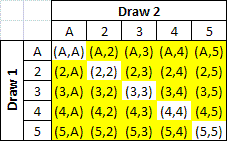
but what we really want is this:
And in order to get it, we change the "<>" operators to ">":
;WITH Draw1 AS (
SELECT Card1 = CardId
FROM Dim_Deck
),
Draw2 AS (
SELECT
Card1,
Card2 = CardId
FROM Dim_Deck D2
JOIN Draw1 D1
ON D1.Card1 > D2.CardId
)
SELECT COUNT(*) FROM Draw2
and we obtain the correct result, 1326 rows.
Monday, June 15, 2009
StackOverflow
Friday, June 12, 2009
T-SQL to Export Table Structure to a script
Wednesday, May 27, 2009
CRM Import - Importing Into Drop-Down Combobox Targets
Thursday, May 21, 2009
BCP out Temp Tables
Monday, May 18, 2009
Case Study: Poker DW: Reporting Questions
- Which players will call a big checkraise on the flop with an overpair?
- What is the actual expected outcome of reraising on the button with a suited connector and bluffing the flop?
Next: ???
Case Study: Poker DW: Entities
The next section begins with the header line "*** POCKET CARDS ***". Here we have such information as the hole cards dealt to the player, and all of the preflop action (fold, check, call, or raise). We can identify three more entities here: Betting Stage, Cards and Actions. The next section, "*** FLOP *** [10s 9d 3h]", contains the same entities, but this time we have community cards. At each step in these sections, we can calculate the pot size and stack sizes for each player. Two more sections, "Turn" and "River", provide similar info.
Special consideration should be given to the next section, "*** SHOW DOWN ***", as it will show us exactly what cards other players held during the hand, allowing us to "backfill" that info for earlier rounds of betting. This will help us answer some important questions in the hand histories. The final section, "*** SUMMARY ***", provides info such as the rake, the Hi hand (and Low if this is a hi/lo split game), and the final pot size (which we can use to verify our "running" pot size throughout the hand).
So let's summarize our entities and their relationships. Central to this is Hands. Hands occur at certain Times at a particular Table, which have Seats. Players make Actions with Money based on Cards appearing at a Betting Stage.
Friday, May 15, 2009
Case Study: Data Warehouse for Poker (Intro)
Guide to Entries:
- Intro (this entry)
- Identifying Entities
- Reporting Questions
Thursday, May 14, 2009
Grouping Datetimes to Identify Sessions
Now, if I only have the events, how do I create sessions around them?
Wednesday, May 6, 2009
Another Version for Calculating Median
Tuesday, May 5, 2009
Querying Sys.Columns & Sys.Types
Running the query:
SELECT
Tb.Name,
C.Name,
Tp.Name
FROM Sys.Tables Tb
JOIN Sys.Schemas Sch
ON Sch.Schema_Id = Tb.Schema_Id
JOIN Sys.Columns C
ON C.Object_Id = Tb.Object_Id
JOIN Sys.Types Tp
ON Tp.System_Type_Id = C.System_Type_Id
WHERE Tb.Name = 'Address'
ORDER BY Tb.Name, C.Name, Tp.Name
produces these results:
Weird, huh? Why did 'AddressLine1' show up six times with six different data types? The reason is two-fold. First, 'AddressLine1' is defined as nvarchar(60), which means that it will also show up as "sysname" datatype (think of "sysname" as MicroSoft's built-in user-defined data type).
Take a look at the results of the query below. It shows that, including itself, six different data types are based on nvarchar! That's why 'AddressLine1' showed up six times in the query above.
SELECT Name FROM Sys.Types Tp
WHERE System_Type_Id = 231
Name
-------------------
nvarchar
sysname
AccountNumber
Name
OrderNumber
Phone
(6 row(s) affected)
So let's change our query to use this 'User_Type_Id' column instead:
SELECT
Tb.Name,
C.Name,
Tp.Name
FROM Sys.Tables Tb
JOIN Sys.Schemas Sch
ON Sch.Schema_Id = Tb.Schema_Id
JOIN Sys.Columns C
ON C.Object_Id = Tb.Object_Id
JOIN Sys.Types Tp
ON Tp.User_Type_Id = C.System_Type_Id
WHERE Tb.Name = 'Address'
ORDER BY Tb.Name, C.Name, Tp.Name
Tuesday, April 21, 2009
Data Patterns and the LIKE Clause
The list of other wildcard characters related to LIKE includes "_", "[", "-", "]", and "^". The first, "_", is the 'any single character' expression. The "[]" characters act as a single character wildcard, but allow us to specify which characters will match. The WHERE clause above is equivalent to "WHERE LastName LIKE '[M][c]%'". When multiple characters reside within the brackets, the filter acts like an "or" expression. So changing the filter to "WHERE LastName LIKE '[M][c][aeiou]%'" would produce last names beginning with "Mc", then followed by a vowel, then any terminating string.
If you use the "-" with the brackets, you can specify ranges of characters (ranges defined by ASCII order). For example, let's say we want to search for user names that begin with 'jmclain' and are then followed by a single digit number. We would execute "SELECT * FROM Users WHERE UserName LIKE 'jmclain[0-9]'".
Where it gets complicated is when you want to search a column for wildcard literals. For example, let's say that you have a column called 'SalesDescription', and you want to count the rows where the SalesDescription column contains the string "50% off". If you were to execute "SELECT COUNT(*) FROM Sales WHERE SalesDescription LIKE '50% off'", you would mistakenly pull in rows with SalesDescription values such as '50 cents off', since the "%" wildcard represents "any string". To correct this, you have two options. The simplest is to enclose the "%" wildcard with brackets, so that the filter changes to "WHERE SalesDescription LIKE '50[%] off'".
The second option is to make use of the ESCAPE clause of the LIKE operator. What this method lacks in simplicity, it make up in robustness (and isn't really that complicated anyways). To solve the above problem suchwise, the filter changes to "WHERE SalesDescription LIKE '50!% off' ESCAPE '!'". I prefer the first method above because 1. it is simpler, and 2. in order to use the ESCAPE clause, you must be certain that your target expression doesn't contain the escape character. So if a given SalesDescription value in the table was, unbeknowst to you, something like '50% off!!!', the results start to become unreliable. Best practices for using ESCAPE stipulate first starting with uncommon characters such as "~" or "", and then querying your column to make sure they are not present.
The best use of ESCAPE is when you want to find brackets in your target. Let's say that you wanted to find the SalesDescription value "[50% off]". After checking to ensure that the column values don't contain the tilde ("~") character, you would use the filter "WHERE SalesDescription LIKE '~[50~% off~]' ESCAPE '~'".
Friday, April 17, 2009
Converting Datetime Values to Varchar
SET NOCOUNT ON
CREATE TABLE #Fmts (FmtNo tinyint, Example varchar(max))
DECLARE @fmt int; SET @fmt = 0
DECLARE @dt datetime; SET @dt = GETDATE()
WHILE @fmt < 132
BEGIN
BEGIN TRY
INSERT INTO #Fmts (FmtNo, Example)
VALUES (@fmt, CONVERT(varchar, @dt, @fmt))
END TRY
BEGIN CATCH
PRINT '@fmt = ' + LTRIM(STR(@fmt)) + ' is not valid.'
END CATCH
SET @fmt = @fmt + 1
END
SELECT FmtNo, Example = LEFT(Example, 30) FROM #Fmts
DROP TABLE #Fmts
SET NOCOUNT OFF
And sample output:

Wednesday, April 15, 2009
Question of the Day
Given this code,
DECLARE @val int;
SET @val = -1
CREATE TABLE #empty (val int)
which statement(s) will result in @val being NULL? (select all that apply)
- SET @val = NULL
- SELECT @val = NULL FROM #empty
- SELECT @val = val FROM #empty
- SELECT @val = (SELECT val FROM #empty)
Monday, April 13, 2009
Collation Sequences
USE NorthWind
GO
SELECT DISTINCT City
FROM dbo.Customers
WHERE CHARINDEX('A', City) > 0
To fix, simply add the "COLLATE" clause to the query:
SELECT DISTINCT City
FROM dbo.Customers
WHERE CHARINDEX('A' COLLATE Latin1_General_BIN, City) > 0